在 Linux 上安装
系统要求
- 系统版本:Ubuntu 22.04+, Debian 11+, Fedora 38+
- 内存:4GB
- CPU:2核
安装说明
在 Debian/Ubuntu 系系统上可使用原生的 .deb 安装包,其它发行版本可以选择使用便捷的 .AppImage 格式。
方法 1:使用 deb 安装包
安装
.deb 是 Debian 系列系统的原生安装包格式,安装后会自动集成到系统应用菜单并生成快捷方式。
- 下载最新的
.deb安装包。 - 双击
.deb文件,进行图形化安装。 或者在终端中运行以下命令:
shell
sudo apt update
sudo apt install ./PileaX-version-amd64.deb
卸载
shell
sudo apt remove pileax方法2:使用 AppImage
AppImage 是一种用于在 Linux 系统上分发便携式软件的格式,下载后无需安装即可运行。
- 下载
.AppImage文件。 - 双击该
.AppImage文件,PileaX 无需安装即可直接运行。
AppImageLauncher
使用 AppImage 运行应用默认是不会集成到应用程序中,也不生成桌面快捷方式。AppImageLauncher 可以帮助你将应用集成到桌面中。
安装 AppImageLauncher,以 Ubuntu 为例:
shell
sudo add-apt-repository ppa:appimagelauncher-team/stable
sudo apt update
sudo apt install appimagelauncher
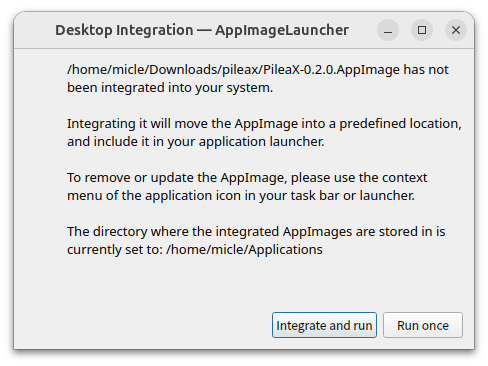
安装好后,再次运行 PileaX 时,会有集成的提示: